> ## Documentation Index
> Fetch the complete documentation index at: https://docs.wikio.ai/llms.txt
> Use this file to discover all available pages before exploring further.
# Changelog
> Product updates and announcements
# WIKIO AI 1.6.27
This release introduces powerful document search capabilities with an enhanced viewer experience, alongside significant upload reliability improvements and better international language support.
## Highlights
✅ Full-text document search with seamless article navigation\
✅ Enhanced download options showing file dimensions and size\
✅ Clear All button for batch upload management\
✅ Arabic and RTL language support for OCR and summaries\
✅ Improved upload stability with race condition fixes
## New Features
### Document Search & Viewer
✅ **Full-text search**: Search across your documents with instant article navigation\
✅ **Unified search experience**: Search input matches the transcript interface style\
✅ **Smart downloads**: Download dropdown displays file metadata including dimensions and size \
✅ **Photo navigation**: Click photos in the Photos tab to jump directly to the document page
### Comments & Reactions
✅ **Auto-focus editor**: Comment editor automatically focuses when opened via teaser\
✅ **Multi-workspace support**: Comments and reactions now work seamlessly across workspaces
## Improvements
### Upload System
✅ Clear All button with confirmation dialog for safer batch management\
✅ Cards now disappear individually rather than all at once during deletion\
✅ Empty date groups automatically clean up after file removal\
✅ Fixed memory leaks and promise resolution issues\
✅ Resolved race conditions in video metadata extraction\
✅ Enhanced cross-workspace security with proper scoping
### International Support
✅ Arabic text now displays correctly with proper RTL alignment\
✅ OCR and summary outputs respect right-to-left languages
### Images
✅ Download dropdown offers both original and normalized image versions
# WIKIO AI 1.5.25
This release introduces powerful new ways to work together and expand your content's reach. Collaborate with your team on reviews, transform your videos into new languages with AI dubbing, and launch AI-powered workflows directly from your library.
## Highlights
✅ Team collaboration with review and commenting features\
✅ AI dubbing to change voices into new languages\
✅ New Apps and Workflows section for launching AI apps directly
 ## New Features
### Collaboration
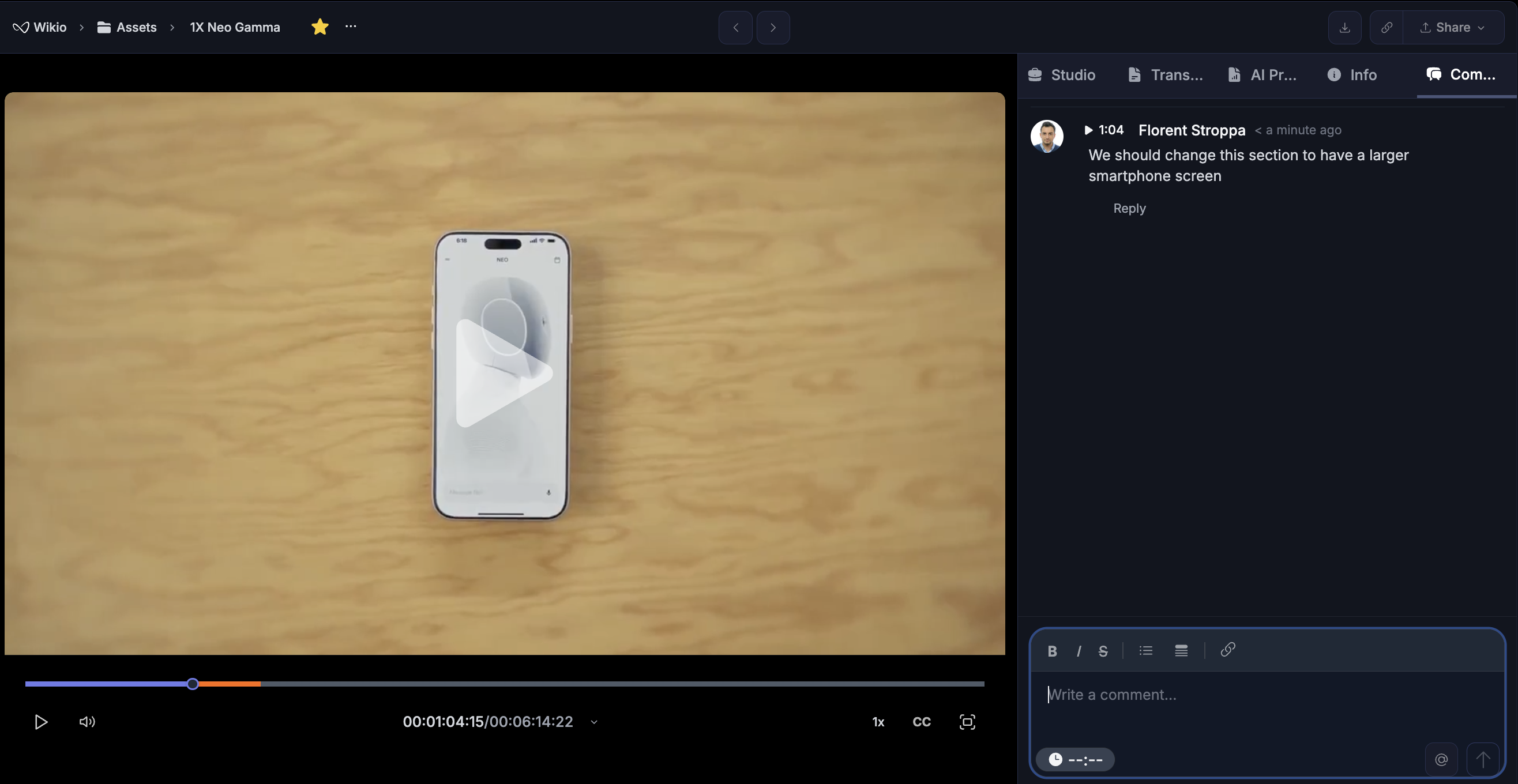
✅ **Content reviews** - Invite team members to review and approve content before publishing\
✅ **Comments and discussions** - Add comments on specific sections to provide feedback and coordinate changes\
✅ **User interactions** - Collaborate with colleagues directly within your content library\\
### Dubbing
✅ **Voice translation** - Transform your content into new languages with AI-generated voices\
✅ **Language expansion** - Reach international audiences without re-recording\\
### Apps and Workflows
✅ **AI apps launcher** - Access and run AI-powered applications directly from WIKIO AI\\
# WIKIO AI 1.4.99
This major release brings powerful Collections enhancements, introduces intelligent profanity detection, delivers significant subtitle improvements, and adds intuitive user profile interactions.
## Highlights
✅ AI-powered profanity detection for content moderation\
✅ Major subtitle UI and AI accuracy improvements\
✅ Enhanced Collections with advanced management features\
✅ New User Profile card for seamless collaboration
## New Features
### Profanity Detector (New AI Feature)
✅ **Automatic profanity detection** - AI identifies inappropriate language in transcripts\
✅ **Word detection modal** - Review flagged words with context and timestamps\
✅ **Detection screen** - Visual interface showing all profanity instances\
✅ **Content moderation** - Ensure brand-safe content before publishing
### Subtitle Enhancements
✅ **New subtitle modal V4** - Completely redesigned interface for better workflow\
✅ **UI improvements V4** - Cleaner, more intuitive subtitle editing experience\
✅ **AI accuracy boost** - Significantly improved subtitle generation quality\
✅ **Enhanced precision** - Better timing and text recognition across languages\\
### Collections Enhancements
✅ **Collections by default** - New items automatically organized into collections\
✅ **Deleted items implementation** - Safely manage and restore deleted content\
✅ **More actions menu** - Expanded options for bulk collection management\
✅ **Multi-select operations** - Select and manage multiple assets simultaneously\\
### User Interface
✅ **User Profile card** - Hover over any user to see profile information\
✅ **Quick collaboration** - Access user details without leaving your workflow\
✅ **Enhanced visibility** - See team member roles and contact information
## Demo Workspace
✅ **Demo environment** - New demo workspace for customer trials and testing\
✅ **Sample content** - Pre-loaded examples showcasing platform capabilities
# WIKIO AI 1.4.51
This transformative release reimagines subtitle workflows with an intelligent conversation-style interface, extends sharing capabilities to entire collections, and introduces comprehensive AI-powered video summaries for instant content understanding.
## Highlights
✅ Revolutionary chat-based subtitle interface with voice profiles\
✅ AI confidence ratings for every translation\
✅ Share entire collections with a single link\
✅ Automatic video summaries powered by advanced AI analysis
## New Features
### Intelligent Subtitle Interface
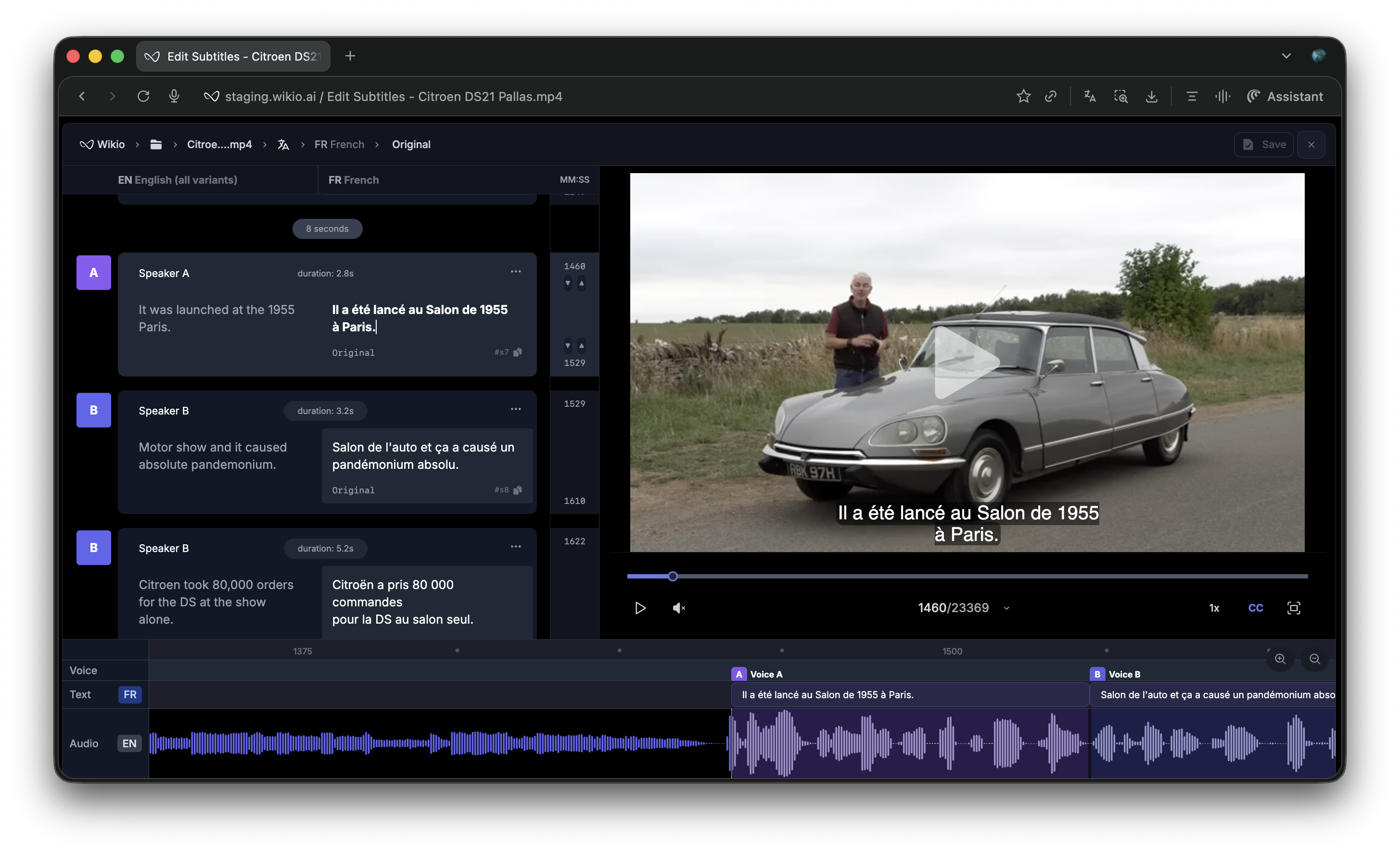
✅ **Chat-style layout** - Subtitle editing reimagined as a natural conversation flow\
✅ **Voice profiles** - Each speaker gets a distinct profile with visual identification\
✅ **AI confidence ratings** - Every translation includes an AI-generated confidence score\
✅ **Translation insights** - Understand why the AI chose specific translations\
✅ **Contextual comments** - AI provides notes on linguistic nuances and alternatives\
✅ **Speaker management** - Easily identify, label, and track different voices across your content
## New Features
### Collaboration
✅ **Content reviews** - Invite team members to review and approve content before publishing\
✅ **Comments and discussions** - Add comments on specific sections to provide feedback and coordinate changes\
✅ **User interactions** - Collaborate with colleagues directly within your content library\\
### Dubbing
✅ **Voice translation** - Transform your content into new languages with AI-generated voices\
✅ **Language expansion** - Reach international audiences without re-recording\\
### Apps and Workflows
✅ **AI apps launcher** - Access and run AI-powered applications directly from WIKIO AI\\
# WIKIO AI 1.4.99
This major release brings powerful Collections enhancements, introduces intelligent profanity detection, delivers significant subtitle improvements, and adds intuitive user profile interactions.
## Highlights
✅ AI-powered profanity detection for content moderation\
✅ Major subtitle UI and AI accuracy improvements\
✅ Enhanced Collections with advanced management features\
✅ New User Profile card for seamless collaboration
## New Features
### Profanity Detector (New AI Feature)
✅ **Automatic profanity detection** - AI identifies inappropriate language in transcripts\
✅ **Word detection modal** - Review flagged words with context and timestamps\
✅ **Detection screen** - Visual interface showing all profanity instances\
✅ **Content moderation** - Ensure brand-safe content before publishing
### Subtitle Enhancements
✅ **New subtitle modal V4** - Completely redesigned interface for better workflow\
✅ **UI improvements V4** - Cleaner, more intuitive subtitle editing experience\
✅ **AI accuracy boost** - Significantly improved subtitle generation quality\
✅ **Enhanced precision** - Better timing and text recognition across languages\\
### Collections Enhancements
✅ **Collections by default** - New items automatically organized into collections\
✅ **Deleted items implementation** - Safely manage and restore deleted content\
✅ **More actions menu** - Expanded options for bulk collection management\
✅ **Multi-select operations** - Select and manage multiple assets simultaneously\\
### User Interface
✅ **User Profile card** - Hover over any user to see profile information\
✅ **Quick collaboration** - Access user details without leaving your workflow\
✅ **Enhanced visibility** - See team member roles and contact information
## Demo Workspace
✅ **Demo environment** - New demo workspace for customer trials and testing\
✅ **Sample content** - Pre-loaded examples showcasing platform capabilities
# WIKIO AI 1.4.51
This transformative release reimagines subtitle workflows with an intelligent conversation-style interface, extends sharing capabilities to entire collections, and introduces comprehensive AI-powered video summaries for instant content understanding.
## Highlights
✅ Revolutionary chat-based subtitle interface with voice profiles\
✅ AI confidence ratings for every translation\
✅ Share entire collections with a single link\
✅ Automatic video summaries powered by advanced AI analysis
## New Features
### Intelligent Subtitle Interface
✅ **Chat-style layout** - Subtitle editing reimagined as a natural conversation flow\
✅ **Voice profiles** - Each speaker gets a distinct profile with visual identification\
✅ **AI confidence ratings** - Every translation includes an AI-generated confidence score\
✅ **Translation insights** - Understand why the AI chose specific translations\
✅ **Contextual comments** - AI provides notes on linguistic nuances and alternatives\
✅ **Speaker management** - Easily identify, label, and track different voices across your content
 ### Video Analysis & Summaries
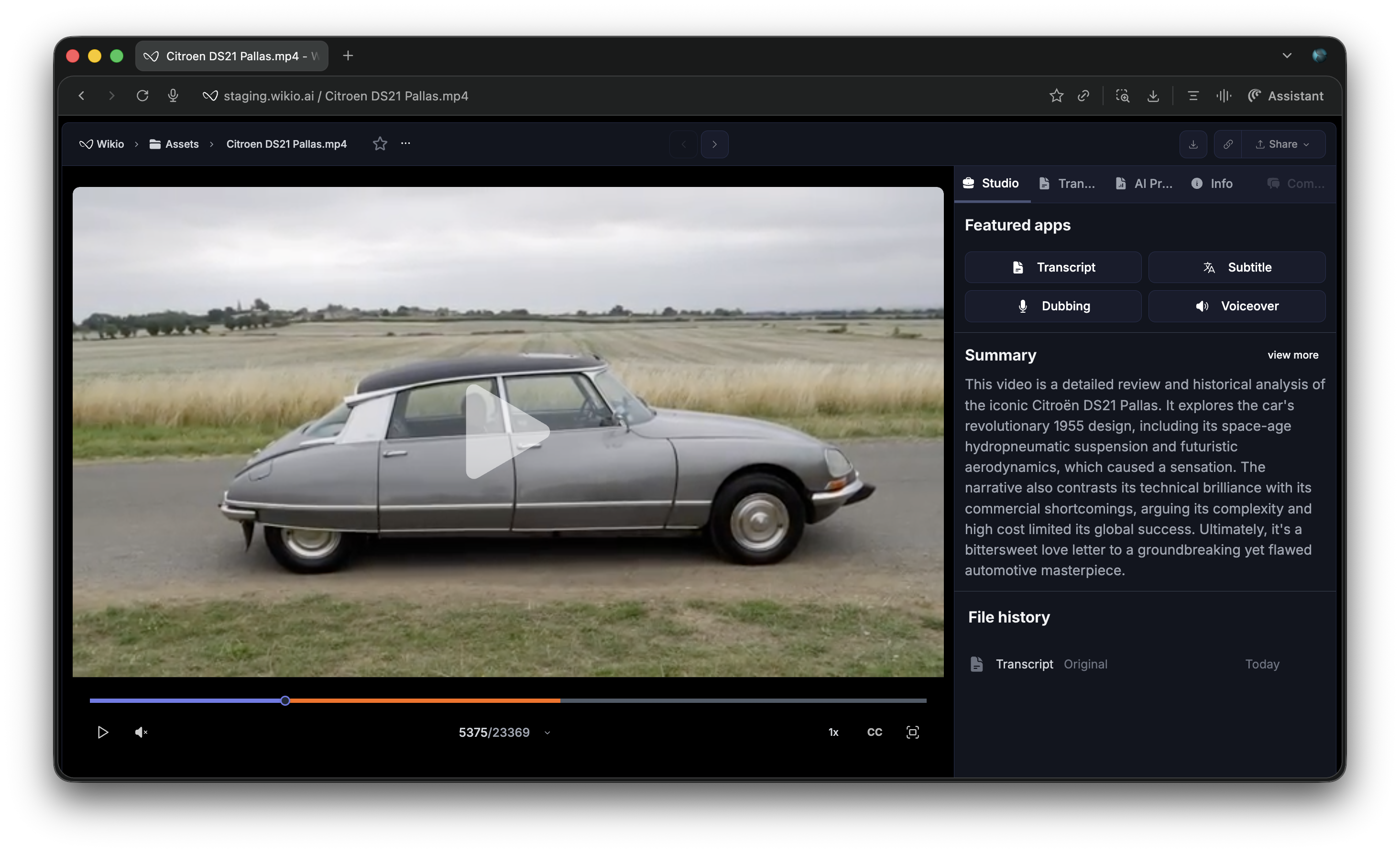
✅ **Automatic video summaries** - AI generates comprehensive summaries for every video\
✅ **Key insights extraction** - Identify main topics, themes, and takeaways instantly\
✅ **Time-stamped highlights** - Summaries include references to important moments\
✅ **Multi-level detail** - Choose between quick overviews and in-depth analysis\
✅ **Enhanced searchability** - Summaries improve search accuracy across your library
### Video Analysis & Summaries
✅ **Automatic video summaries** - AI generates comprehensive summaries for every video\
✅ **Key insights extraction** - Identify main topics, themes, and takeaways instantly\
✅ **Time-stamped highlights** - Summaries include references to important moments\
✅ **Multi-level detail** - Choose between quick overviews and in-depth analysis\
✅ **Enhanced searchability** - Summaries improve search accuracy across your library
 ### Collection Sharing
✅ **Share entire collections** - Generate shareable links for complete collections, not just individual items\
✅ **Unified access** - Give collaborators access to multiple related videos at once\
✅ **Collection previews** - Shared collections display rich previews with metadata\
✅ **Granular control** - Manage sharing permissions at the collection level
## Improvements
✅ Refined subtitle rendering performance across all view modes\
✅ Enhanced collection management with improved bulk operations\
✅ Faster video analysis processing pipeline
# WIKIO AI 1.3.45
This milestone release marks WIKIO AI's transition to true self-service with a complete sign-up experience, redesigned transactional emails, and a flexible AI credit system for billing.
## Highlights
✅ First self-service sign-up flow, no more waiting for invites\
✅ Professional transactional email design across all communications\
✅ AI credit system with flexible credit packs\
✅ Comprehensive billing and usage management pages
### Collection Sharing
✅ **Share entire collections** - Generate shareable links for complete collections, not just individual items\
✅ **Unified access** - Give collaborators access to multiple related videos at once\
✅ **Collection previews** - Shared collections display rich previews with metadata\
✅ **Granular control** - Manage sharing permissions at the collection level
## Improvements
✅ Refined subtitle rendering performance across all view modes\
✅ Enhanced collection management with improved bulk operations\
✅ Faster video analysis processing pipeline
# WIKIO AI 1.3.45
This milestone release marks WIKIO AI's transition to true self-service with a complete sign-up experience, redesigned transactional emails, and a flexible AI credit system for billing.
## Highlights
✅ First self-service sign-up flow, no more waiting for invites\
✅ Professional transactional email design across all communications\
✅ AI credit system with flexible credit packs\
✅ Comprehensive billing and usage management pages
 ## New Features
### Self-Service Sign-Up
✅ **Complete sign-up flow** - Create your account and start using WIKIO AI immediately\
✅ **Polished onboarding** - Clean, intuitive sign-up experience\
✅ **Instant workspace creation** - Get up and running in seconds\
✅ **Email verification** - Secure account activation process
### Email Communications
✅ **Redesigned email templates** - All transactional emails now feature a modern, branded design\
✅ **Improved readability** - Consistent styling across all email communications
### Billing & Credit System
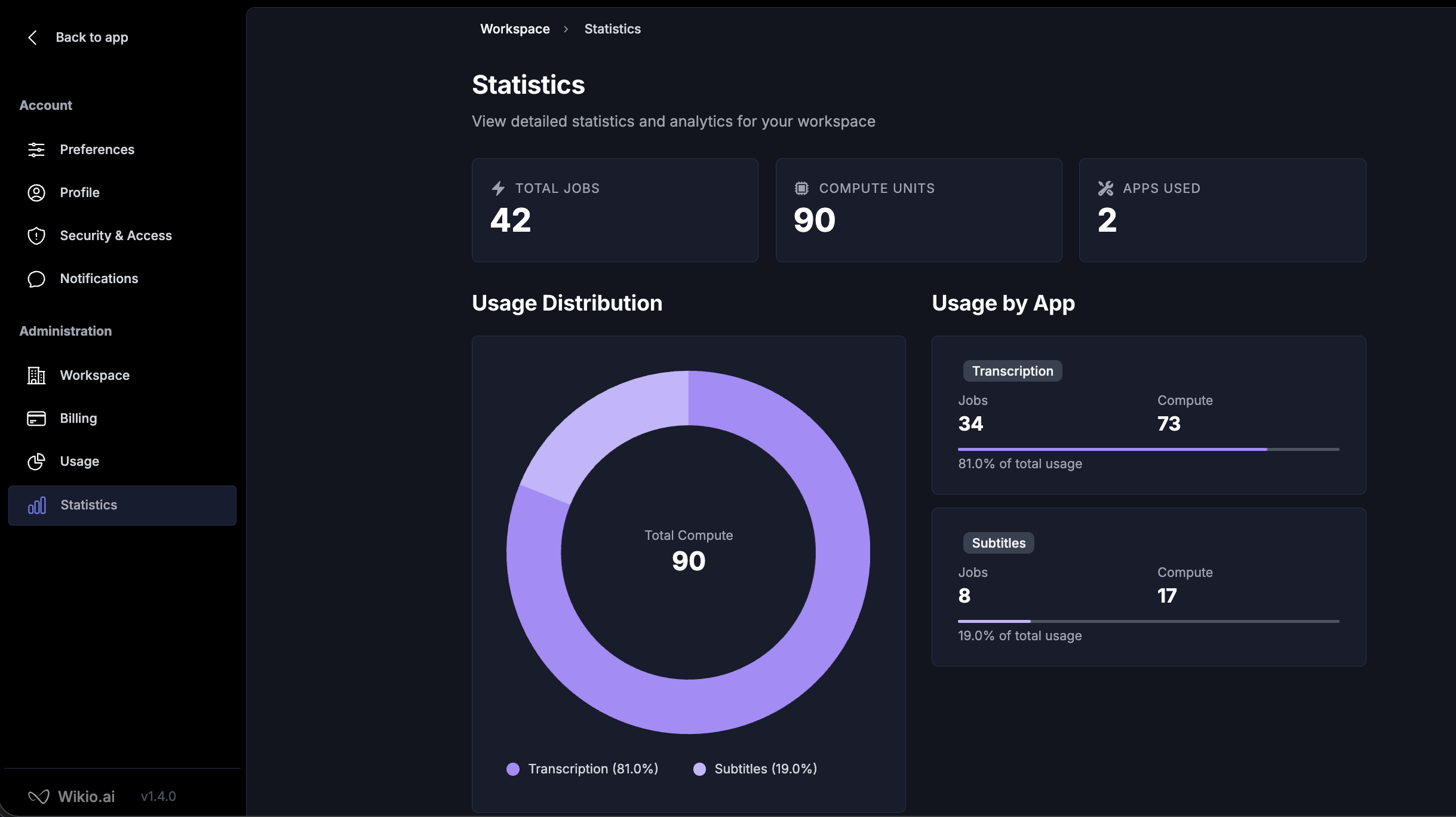
✅ **AI credit system** - Flexible credit-based billing for AI features and processing\
✅ **Credit packs** - Purchase credit packs that fit your usage needs\
✅ **Usage statistics** - Track your AI credit consumption and processing history\
✅ **Separate billing page** - Dedicated interface for managing payment methods and invoices\
✅ **Usage dashboard** - Monitor your workspace's resource consumption in real-time\\
# WIKIO AI 1.3.6
This release introduces intelligent subtitle generation with manual editing capabilities and a powerful Collections feature for organizing your content library.
## Highlights
✅ AI-powered subtitle generation with manual editing control\
✅ Collections for grouping and organizing content\
✅ Seamless subtitle customization workflow\
✅ Upload improvements to support direct upload to a collection
## New Features
### Self-Service Sign-Up
✅ **Complete sign-up flow** - Create your account and start using WIKIO AI immediately\
✅ **Polished onboarding** - Clean, intuitive sign-up experience\
✅ **Instant workspace creation** - Get up and running in seconds\
✅ **Email verification** - Secure account activation process
### Email Communications
✅ **Redesigned email templates** - All transactional emails now feature a modern, branded design\
✅ **Improved readability** - Consistent styling across all email communications
### Billing & Credit System
✅ **AI credit system** - Flexible credit-based billing for AI features and processing\
✅ **Credit packs** - Purchase credit packs that fit your usage needs\
✅ **Usage statistics** - Track your AI credit consumption and processing history\
✅ **Separate billing page** - Dedicated interface for managing payment methods and invoices\
✅ **Usage dashboard** - Monitor your workspace's resource consumption in real-time\\
# WIKIO AI 1.3.6
This release introduces intelligent subtitle generation with manual editing capabilities and a powerful Collections feature for organizing your content library.
## Highlights
✅ AI-powered subtitle generation with manual editing control\
✅ Collections for grouping and organizing content\
✅ Seamless subtitle customization workflow\
✅ Upload improvements to support direct upload to a collection
 ## New Features
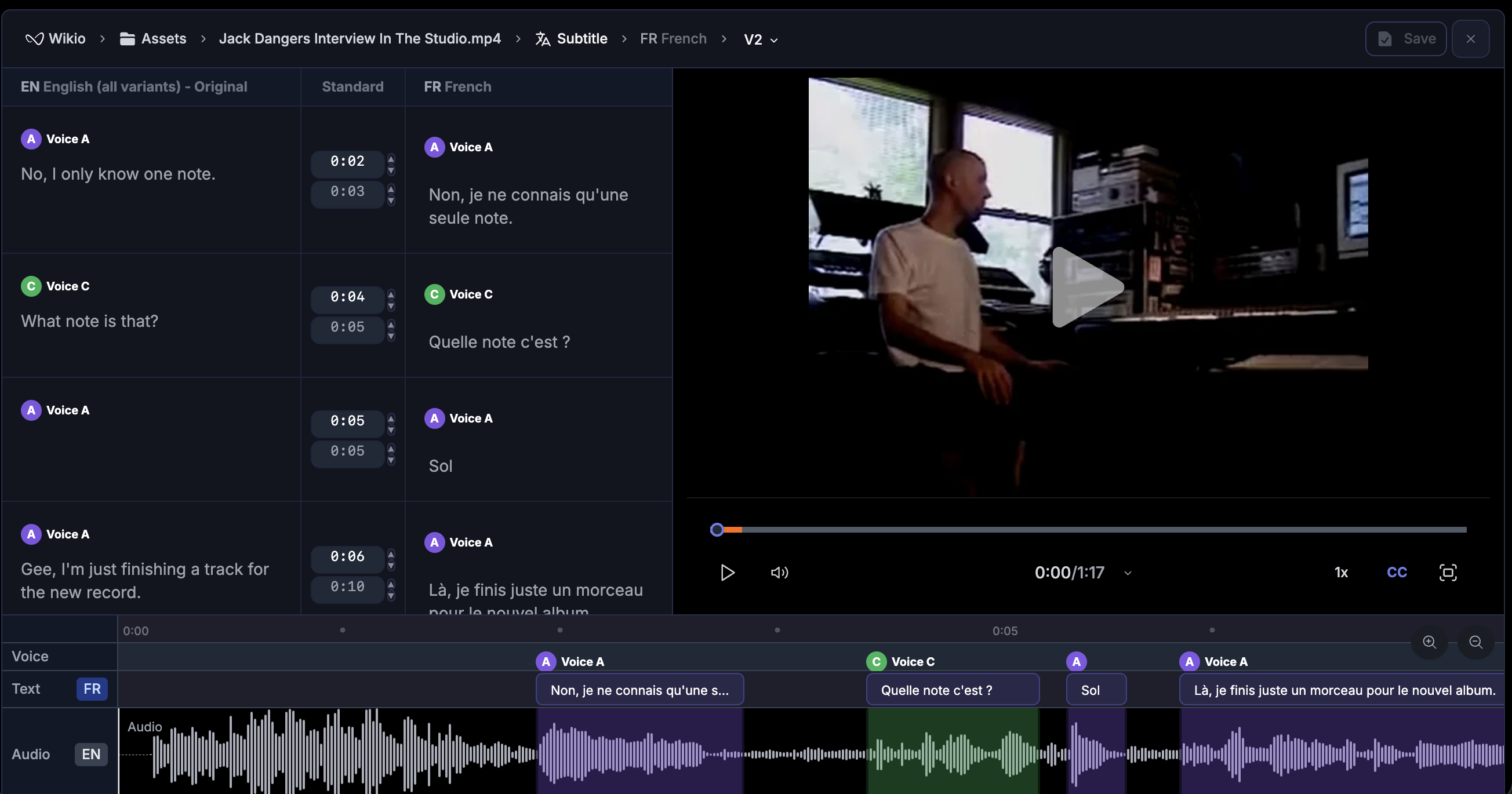
### Sub-title Feature
✅ **AI-powered generation** - Automatically generate subtitles using advanced AI\
✅ **Manual editing control** - Ability to edit and refine AI-generated subtitles\
✅ **Customizable timing** - Adjust subtitle timing and duration for perfect sync\
✅ **Text formatting** - Format subtitle text with style and positioning options\
✅ **Real-time preview** - See changes instantly as you edit subtitles\\
### Collections
✅ **Content grouping** - Organize related videos and transcripts into collections\
✅ **Custom naming** - Create meaningful collection names for easy identification\
✅ **Bulk management** - Add or remove multiple items from collections at once\
✅ **Smart filtering** - Filter and search within specific collections
## Improvements
✅ Enhanced transcript rendering performance\
✅ Improved collection management interface
# WIKIO AI 1.2.47
This major release transforms the transcript editing experience with smart drafts, introduces flexible video controls, and introduces billing with Business plans and enterprise options.
## Highlights
✅ First release of the manual transcript editor\
✅ Draft system with auto-save for safer transcript editing\
✅ Merge, share, and search transcript segments effortlessly\
✅ External video controls mode for cleaner interface\
✅ Redesigned billing with Business plans and enterprise contact
## New Features
### Sub-title Feature
✅ **AI-powered generation** - Automatically generate subtitles using advanced AI\
✅ **Manual editing control** - Ability to edit and refine AI-generated subtitles\
✅ **Customizable timing** - Adjust subtitle timing and duration for perfect sync\
✅ **Text formatting** - Format subtitle text with style and positioning options\
✅ **Real-time preview** - See changes instantly as you edit subtitles\\
### Collections
✅ **Content grouping** - Organize related videos and transcripts into collections\
✅ **Custom naming** - Create meaningful collection names for easy identification\
✅ **Bulk management** - Add or remove multiple items from collections at once\
✅ **Smart filtering** - Filter and search within specific collections
## Improvements
✅ Enhanced transcript rendering performance\
✅ Improved collection management interface
# WIKIO AI 1.2.47
This major release transforms the transcript editing experience with smart drafts, introduces flexible video controls, and introduces billing with Business plans and enterprise options.
## Highlights
✅ First release of the manual transcript editor\
✅ Draft system with auto-save for safer transcript editing\
✅ Merge, share, and search transcript segments effortlessly\
✅ External video controls mode for cleaner interface\
✅ Redesigned billing with Business plans and enterprise contact
 ## New Features
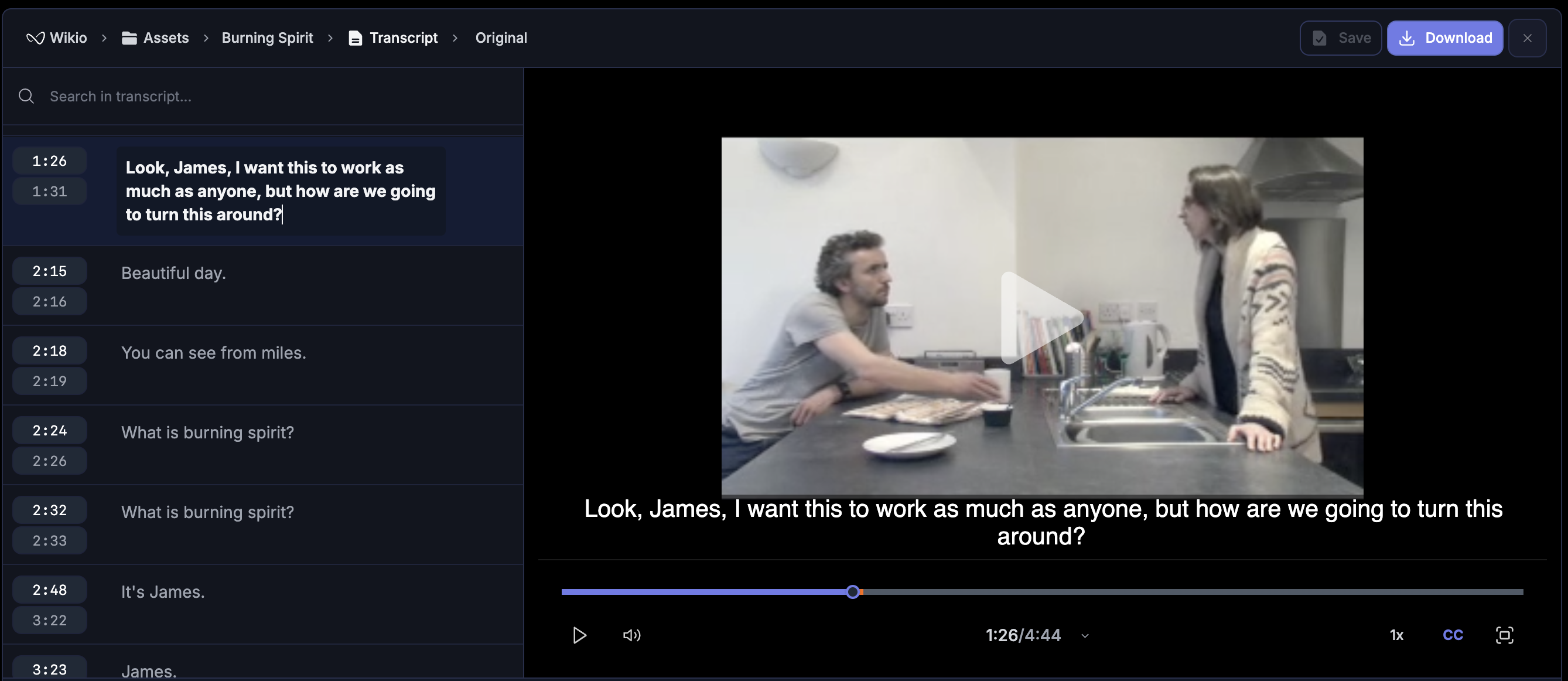
### Transcript Editor
✅ **Draft system with auto-save** - Edit transcripts safely with automatic saving\
✅ **Merge adjacent segments** - Combine segments for better text management\
✅ **Share specific moments** - Generate direct links to segments with timestamps\
✅ **Navigate by timestamp** - Jump directly to segments using URL timestamps\
✅ **Real-time search** - Find content quickly in edit mode\
✅ **Delete segments** - Remove unwanted segments individually\\
### Video Player
✅ **External controls mode** - Free up subtitle space by moving controls outside\
✅ **Dynamic fullscreen** - Controls adapt automatically to display mode\
✅ **Smoother seeking** - Improved manual navigation with better responsiveness\
✅ **Active CC indicator** - Blue icon shows when subtitles are on
### Billing & Plans
✅ **Business plan** - Introduction to business and entreprise plans\
✅ **Enterprise contact requests** - Request information for Enterprise plans\
✅ **Access restrictions** - Only workspace owners can manage billing and plans
# WIKIO AI 1.1.38
This release makes video processing more reliable, streamlines uploads, and introduces the first version of item sharing with previews.
## Highlights
✅ More reliable video processing with accurate progress tracking\
✅ Improved assets and moments views, including filtering by people\
✅ First version of the share feature with preview links and OpenGraph support
## New Features
### Transcript Editor
✅ **Draft system with auto-save** - Edit transcripts safely with automatic saving\
✅ **Merge adjacent segments** - Combine segments for better text management\
✅ **Share specific moments** - Generate direct links to segments with timestamps\
✅ **Navigate by timestamp** - Jump directly to segments using URL timestamps\
✅ **Real-time search** - Find content quickly in edit mode\
✅ **Delete segments** - Remove unwanted segments individually\\
### Video Player
✅ **External controls mode** - Free up subtitle space by moving controls outside\
✅ **Dynamic fullscreen** - Controls adapt automatically to display mode\
✅ **Smoother seeking** - Improved manual navigation with better responsiveness\
✅ **Active CC indicator** - Blue icon shows when subtitles are on
### Billing & Plans
✅ **Business plan** - Introduction to business and entreprise plans\
✅ **Enterprise contact requests** - Request information for Enterprise plans\
✅ **Access restrictions** - Only workspace owners can manage billing and plans
# WIKIO AI 1.1.38
This release makes video processing more reliable, streamlines uploads, and introduces the first version of item sharing with previews.
## Highlights
✅ More reliable video processing with accurate progress tracking\
✅ Improved assets and moments views, including filtering by people\
✅ First version of the share feature with preview links and OpenGraph support
 ## Improved
### Assets and Moments
✅ Updated design for asset and result headers\
✅ Moments view now shows improvements for clarity and speed\
✅ Filter assets by people for faster discovery
### Upload and Processing
✅ Upload percentage display is more accurate and easier to read\
✅ Upload bar now reflects true upload progress\
✅ New process states give better visibility into background tasks
### Sharing
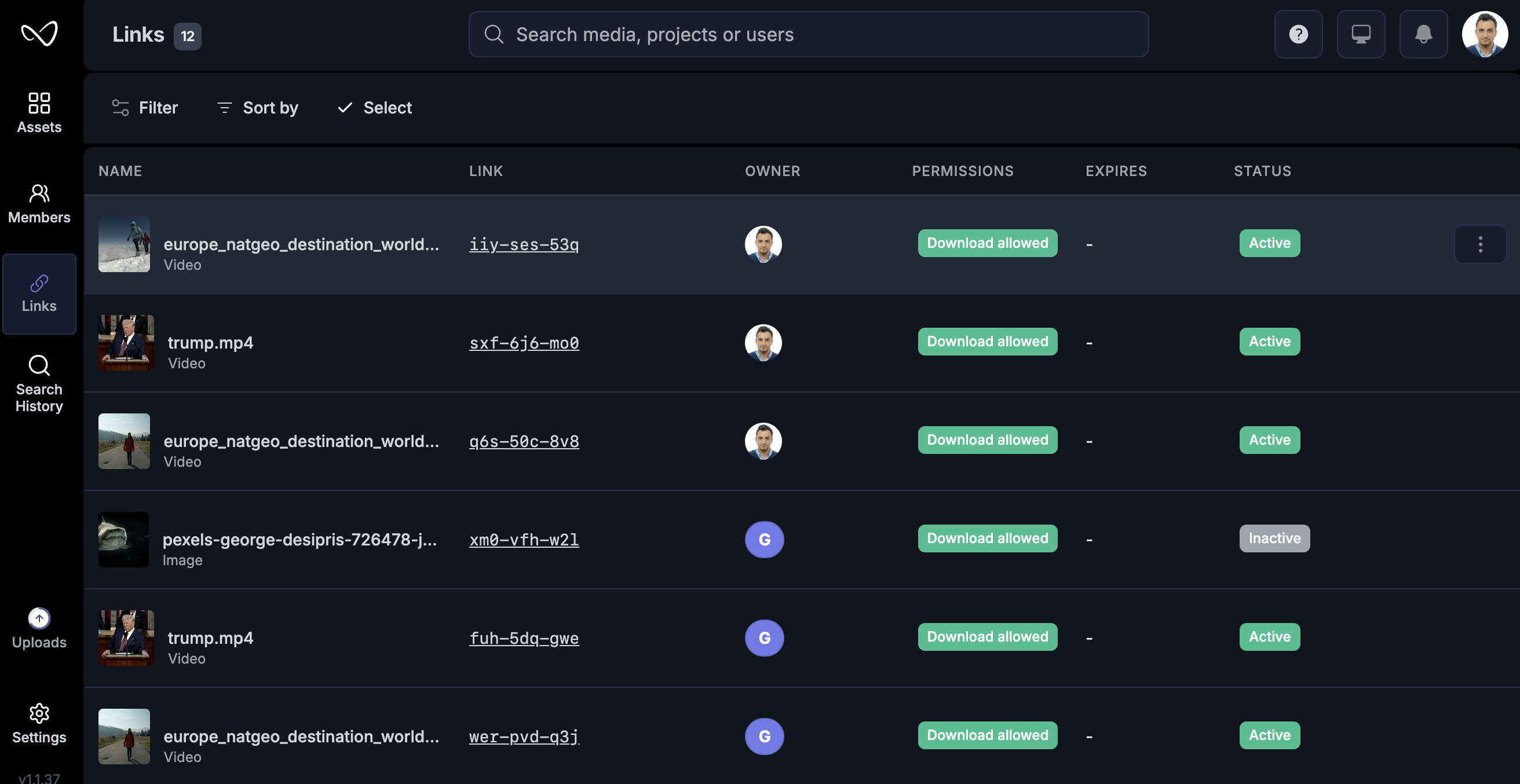
✅ Share items with previews directly from the platform\
✅ OpenGraph support for richer link previews\
✅ Shared links management page
# Version 1.1
This release improves the video player, delivers a transcript experience, and refines key parts of the interface to make your workflows smoother.
## Improved
### Assets and Moments
✅ Updated design for asset and result headers\
✅ Moments view now shows improvements for clarity and speed\
✅ Filter assets by people for faster discovery
### Upload and Processing
✅ Upload percentage display is more accurate and easier to read\
✅ Upload bar now reflects true upload progress\
✅ New process states give better visibility into background tasks
### Sharing
✅ Share items with previews directly from the platform\
✅ OpenGraph support for richer link previews\
✅ Shared links management page
# Version 1.1
This release improves the video player, delivers a transcript experience, and refines key parts of the interface to make your workflows smoother.
 ## Highlights
✅ Better video playback controls with improved timescale and speed options\
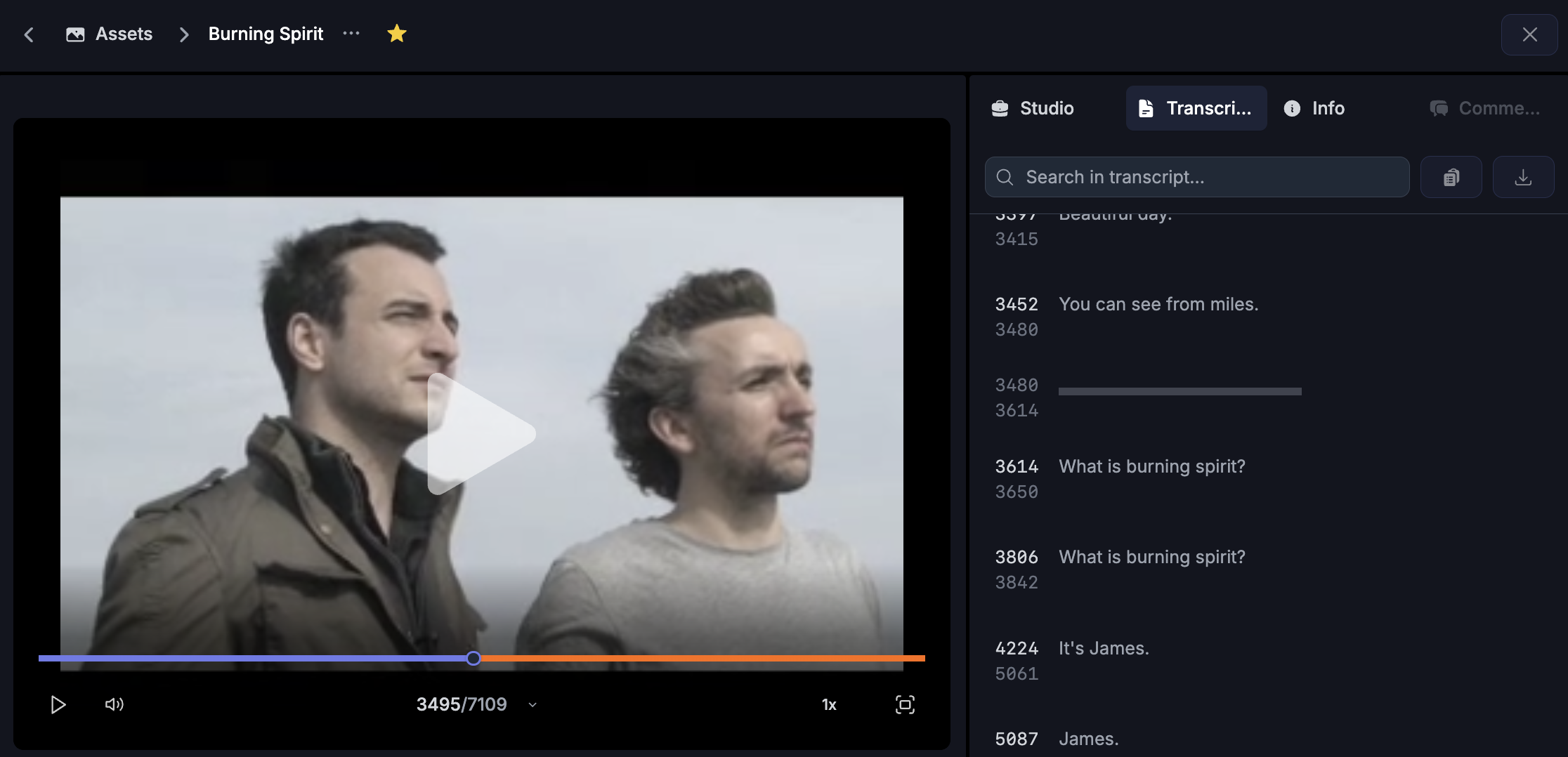
✅ New transcript view with sidebar integration\
✅ Enhanced photo item view inside the assets section\
✅ Refined UI for Studio and Info tabs
## Improved
### Video player
✅ Time format options: switch between standard, timecode, and frame formats for more precise navigation\
✅ Speed control improvements for flexible playback
### Assets
✅ Photo item view improvements for clearer previews and easier interactions
### Transcript
✅ New transcript view to explore and interact with AI-generated transcripts\
✅ Right sidebar improvements to make transcript features more accessible
### UI
✅ Right sidebar improvements: you can now reorder tabs by dragging them where you want
## Not in this release
* Projects
* Teams
* Subtitles and dubbing
## Known limits
* Transcript accuracy still depends on the quality of the source audio
* Some video formats may not fully support advanced timescale controls
* Sidebar layout may differ slightly depending on screen resolution
## What’s next
* Projects and Teams
* Bulk import tools with progress tracking
* Subtitles and dubbing
* Quick actions palette for power users
# Version 1.0
This is the first version of Wikio. It introduces the core account and workspace model, a sleek video player, and an AI powered search that helps you find what matters across your library.
## Highlights
✅ User accounts with profile, preferences, and notifications\
✅ Workspace with invites and member management\
✅ Video player with familiar shortcuts and precise controls\
✅ AI search across assets and metadata
## Added
### User management
✅ Sign up, sign in, and secure session handling\
✅ Profile and preferences\
✅ Notification center with in-app and email options
### Workspace
✅ Single workspace per user in this release\
✅ Invite members and set access levels\
✅ Basic member list and roles
### Video player
✅ Play or pause, scrubber, volume, captions, fullscreen\
✅ YouTube and Netflix style keys: Space
, K
, J
, L
, F
, M
, arrows\
✅ Precision controls: frame step while paused, quick seek while playing\
✅ See full list of keys on the [video player](/features/video-player) page
### AI search
✅ Natural language queries over items and metadata\
✅ Filters to narrow by type and time\
✅ Search history to revisit recent queries
## Not in this release
* Projects
* Teams
## Known limits
* Some browser or OS shortcuts can conflict with player keys. If that happens, use on screen controls.
* Frame step accuracy depends on the source frame rate embedded in the file.
* Search indexing runs in the background after large imports. Freshly uploaded items may take a short time to appear.
## What’s next
* Projects and Teams
* Bulk import tools and progress tracking
* Sub-title and dubbing features
* Quick actions palette for power users
## Highlights
✅ Better video playback controls with improved timescale and speed options\
✅ New transcript view with sidebar integration\
✅ Enhanced photo item view inside the assets section\
✅ Refined UI for Studio and Info tabs
## Improved
### Video player
✅ Time format options: switch between standard, timecode, and frame formats for more precise navigation\
✅ Speed control improvements for flexible playback
### Assets
✅ Photo item view improvements for clearer previews and easier interactions
### Transcript
✅ New transcript view to explore and interact with AI-generated transcripts\
✅ Right sidebar improvements to make transcript features more accessible
### UI
✅ Right sidebar improvements: you can now reorder tabs by dragging them where you want
## Not in this release
* Projects
* Teams
* Subtitles and dubbing
## Known limits
* Transcript accuracy still depends on the quality of the source audio
* Some video formats may not fully support advanced timescale controls
* Sidebar layout may differ slightly depending on screen resolution
## What’s next
* Projects and Teams
* Bulk import tools with progress tracking
* Subtitles and dubbing
* Quick actions palette for power users
# Version 1.0
This is the first version of Wikio. It introduces the core account and workspace model, a sleek video player, and an AI powered search that helps you find what matters across your library.
## Highlights
✅ User accounts with profile, preferences, and notifications\
✅ Workspace with invites and member management\
✅ Video player with familiar shortcuts and precise controls\
✅ AI search across assets and metadata
## Added
### User management
✅ Sign up, sign in, and secure session handling\
✅ Profile and preferences\
✅ Notification center with in-app and email options
### Workspace
✅ Single workspace per user in this release\
✅ Invite members and set access levels\
✅ Basic member list and roles
### Video player
✅ Play or pause, scrubber, volume, captions, fullscreen\
✅ YouTube and Netflix style keys: Space
, K
, J
, L
, F
, M
, arrows\
✅ Precision controls: frame step while paused, quick seek while playing\
✅ See full list of keys on the [video player](/features/video-player) page
### AI search
✅ Natural language queries over items and metadata\
✅ Filters to narrow by type and time\
✅ Search history to revisit recent queries
## Not in this release
* Projects
* Teams
## Known limits
* Some browser or OS shortcuts can conflict with player keys. If that happens, use on screen controls.
* Frame step accuracy depends on the source frame rate embedded in the file.
* Search indexing runs in the background after large imports. Freshly uploaded items may take a short time to appear.
## What’s next
* Projects and Teams
* Bulk import tools and progress tracking
* Sub-title and dubbing features
* Quick actions palette for power users