> ## Documentation Index
> Fetch the complete documentation index at: https://docs.wikio.ai/llms.txt
> Use this file to discover all available pages before exploring further.
# Video player
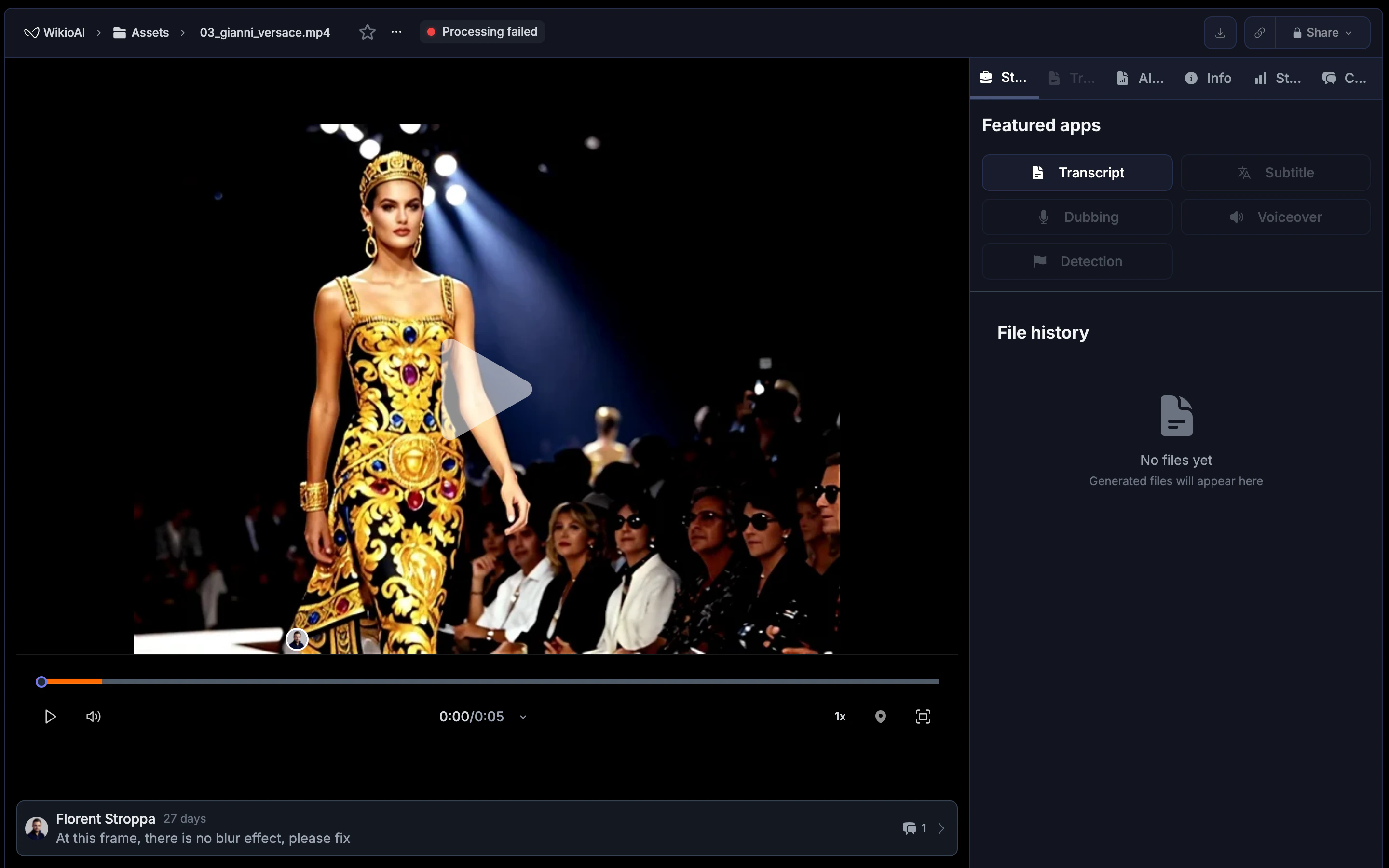
> A sleek, reusable video player with YouTube-style shortcuts and editor-level precision: frame step, markers, jog or shuttle, subtitle sync.
A reusable component for previewing video assets within pages like the homepage or the content item screen. It includes play or pause, scrubber, volume, captions, and fullscreen. The look is sleek and modern, while shortcuts feel familiar to YouTube and Netflix.
 Use the keys shown in kbd tags. On Mac, ⌥ means Option. On Windows or Linux, use Alt.
## Basic playback
Space → Play or pause\
K → Stop playback\
L → Play forward. Press repeatedly to increase speed to 2x, 4x, 8x\
J → Play backward. Press repeatedly to increase reverse speed to −2x, −4x, −8x\
⇧ Shift + L or ⇧ Shift + J → Slow play forward or backward at 0.5x
## Accurate navigation
**When playing**
← → Seek back 5 s\
→ → Seek forward 5 s
**When paused**
← → Step back 1 frame\
→ → Step forward 1 frame\
⇧ Shift + ← → Step back 5 frames\
⇧ Shift + → → Step forward 5 frames
## Audio and subtitles
↑ or 🔉 ↓ → Increase or decrease volume\
M → Mute or unmute\
C → Toggle captions or subtitles if available
## Display
F → Toggle fullscreen\
Esc → Exit fullscreen
## Editor tools
These controls add precision for review and editing.
* Add marker at playhead → B
* Loop between in and out → set I for in, O for out, then ; to toggle loop
* Jog or shuttle (fine control) → Hold K and tap L or J for micro stepping
* Subtitle sync offset → ⌥ Alt + , shifts subtitles −50 ms, ⌥ Alt + . shifts +50 ms
* Jump to markers → ⌥ Alt + ← previous, ⌥ Alt + → next
Shortcuts can vary by keyboard layout. If a key conflicts with a browser or OS shortcut, use the in player menu to remap it.
## Quick reference
| Action | Shortcut |
| -------------------------- | ---------------------------------------------------------------------- |
| Play or pause | Space |
| Stop | K |
| Faster forward or backward | L or J (repeat) |
| Slow play | ⇧ Shift + L or ⇧ Shift + J |
| Seek ±5 s (playing) | ← or → |
| Frame step ±1 (paused) | ← or → |
| Frame step ±5 (paused) | ⇧ Shift + ← or ⇧ Shift + → |
| Volume up or down | ↑ or ↓ |
| Mute | M |
| Captions | C |
| Fullscreen or exit | F or Esc |
| Add marker | B |
| Loop in or out | I or O then ; |
| Next or previous marker | ⌥ Alt + → or ⌥ Alt + ← |
| Subtitle sync ±50 ms | ⌥ Alt + , or ⌥ Alt + . |
Use the keys shown in kbd tags. On Mac, ⌥ means Option. On Windows or Linux, use Alt.
## Basic playback
Space → Play or pause\
K → Stop playback\
L → Play forward. Press repeatedly to increase speed to 2x, 4x, 8x\
J → Play backward. Press repeatedly to increase reverse speed to −2x, −4x, −8x\
⇧ Shift + L or ⇧ Shift + J → Slow play forward or backward at 0.5x
## Accurate navigation
**When playing**
← → Seek back 5 s\
→ → Seek forward 5 s
**When paused**
← → Step back 1 frame\
→ → Step forward 1 frame\
⇧ Shift + ← → Step back 5 frames\
⇧ Shift + → → Step forward 5 frames
## Audio and subtitles
↑ or 🔉 ↓ → Increase or decrease volume\
M → Mute or unmute\
C → Toggle captions or subtitles if available
## Display
F → Toggle fullscreen\
Esc → Exit fullscreen
## Editor tools
These controls add precision for review and editing.
* Add marker at playhead → B
* Loop between in and out → set I for in, O for out, then ; to toggle loop
* Jog or shuttle (fine control) → Hold K and tap L or J for micro stepping
* Subtitle sync offset → ⌥ Alt + , shifts subtitles −50 ms, ⌥ Alt + . shifts +50 ms
* Jump to markers → ⌥ Alt + ← previous, ⌥ Alt + → next
Shortcuts can vary by keyboard layout. If a key conflicts with a browser or OS shortcut, use the in player menu to remap it.
## Quick reference
| Action | Shortcut |
| -------------------------- | ---------------------------------------------------------------------- |
| Play or pause | Space |
| Stop | K |
| Faster forward or backward | L or J (repeat) |
| Slow play | ⇧ Shift + L or ⇧ Shift + J |
| Seek ±5 s (playing) | ← or → |
| Frame step ±1 (paused) | ← or → |
| Frame step ±5 (paused) | ⇧ Shift + ← or ⇧ Shift + → |
| Volume up or down | ↑ or ↓ |
| Mute | M |
| Captions | C |
| Fullscreen or exit | F or Esc |
| Add marker | B |
| Loop in or out | I or O then ; |
| Next or previous marker | ⌥ Alt + → or ⌥ Alt + ← |
| Subtitle sync ±50 ms | ⌥ Alt + , or ⌥ Alt + . |